
Navigating the Dashboard
Overview of the main dashboard, stats, quick actions
3 min read•Article 6 of 9 in Getting Started
Navigating the Dashboard
The Dashboard is your home base in AUDIGYD. It provides an at-a-glance view of your workspace's compliance status and quick access to common actions.
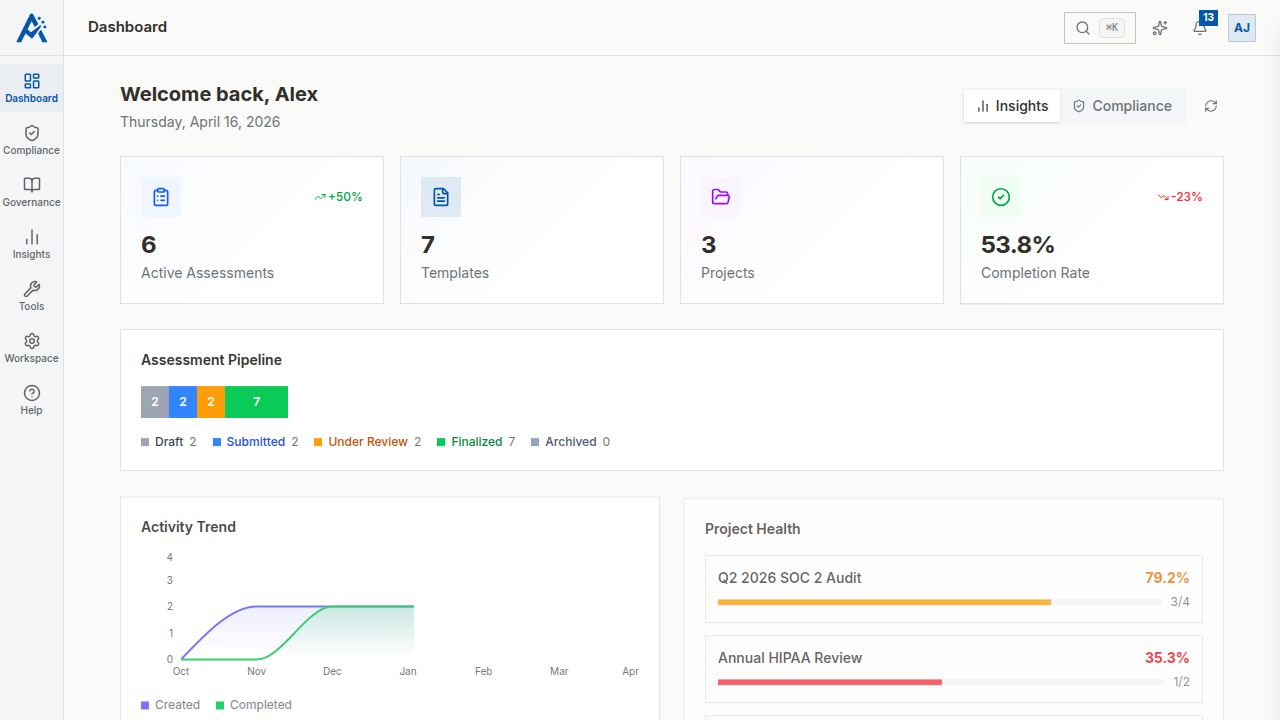
Dashboard Overview
When you log in, you'll see:
- •Compliance Score — Your workspace's overall compliance score based on finalized assessments
- •Active Assessments — Count and status breakdown of in-progress assessments
- •Recent Activity — Timeline of recent actions across the workspace
- •Quick Actions — Shortcuts to common tasks like creating an assessment or viewing reports
Key Metrics
The dashboard displays several important metrics:
- •Total Assessments — Total number of assessments in all states
- •Pending Reviews — Assessments submitted and awaiting review
- •Compliance Trend — How your compliance score has changed over time
- •Upcoming Due Dates — Assessments approaching their deadlines
Quick Actions
From the dashboard, you can quickly:
- •Create a new assessment
- •View pending reviews
- •Access recent reports
- •Navigate to templates
Navigation
Use the sidebar to navigate to different sections:
- •Templates — Manage your assessment templates
- •Assessments — View and manage assessments
- •Projects — Organize assessments into projects
- •Reports — Access assessment reports
- •Analytics — View compliance analytics and trends
- •Members — Manage team members
- •Settings — Configure workspace settings