
Creating a Template with AI
Using the AI template generator, selecting frameworks, reviewing generated content
4 min read•Article 2 of 9 in Templates
Creating a Template with AI
AUDIGYD's AI Template Generator can create a complete assessment template from a simple description. This is the fastest way to get started.
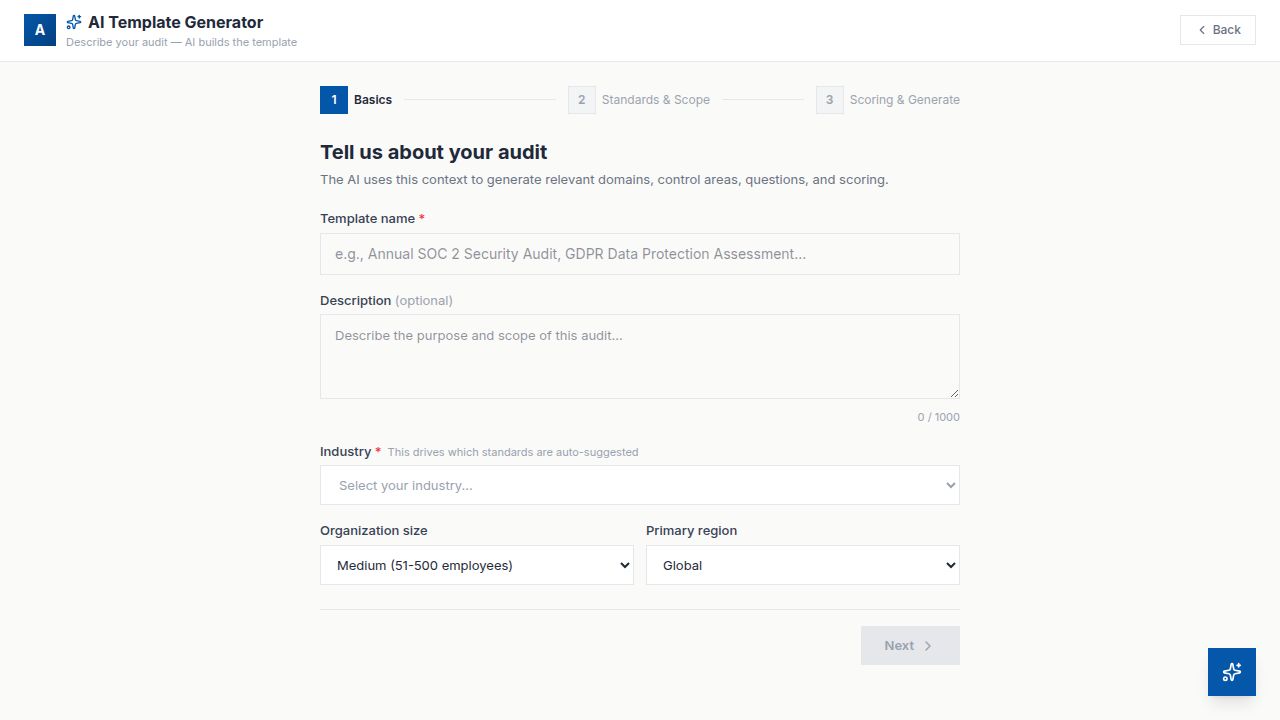
How to Use the AI Generator
1.Navigate to Templates > New Template
2.Select AI Generator
3.Provide the following inputs:
- Framework — Select a compliance framework (SOC 2, ISO 27001, GDPR, etc.) or enter a custom topic
- Description — Describe what the assessment should cover
- Scope — Specify any particular areas to focus on or exclude
4.Click Generate Template
What the AI Creates
The AI will generate:
- •Organized domains based on the framework or topic
- •Control areas within each domain
- •Relevant questions with appropriate types
- •Suggested scoring weights
- •Question descriptions and guidance text
Reviewing Generated Content
After generation, you'll be taken to the template builder where you can:
- •Review all generated domains, control areas, and questions
- •Edit, add, or remove any content
- •Adjust question types and weights
- •Modify scoring configuration
- •Add critical gates where needed
Tips for Best Results
- •Be specific in your description — "SOC 2 Type II assessment for a SaaS company" works better than "compliance assessment"
- •Mention specific areas of focus — "emphasize data encryption and access controls"
- •Review all generated questions — AI provides a great starting point, but human review ensures accuracy
- •Adjust weights to match your organization's priorities